Advanced features
These are some advanced features and configuration capabilities available on Trivore ID for user directories.
Linking multiple user directories to single Trivore ID user account
This use is semi common in enterprises, where a certain person may have user accounts in multiple external directories, such as Azure AD, or Google Workspace. Here we show how those external accounts may be consolidated to a single identity on Trivore ID.
A bonus capability is, single sign-on (SSO) functions flawlessly. Another bonus is, the user account / identity on Trivore ID may at any time be enriched with higher level of assurance (LoA) information with suomi.fi-tunnistus or other means.
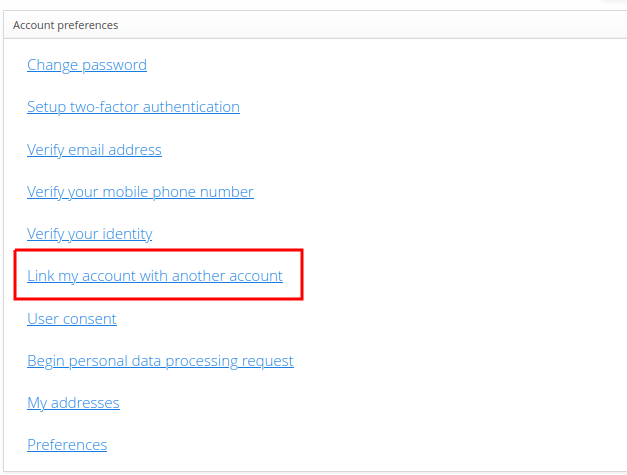
End users themselves are able to link their Trivore ID user account with multiple external user directory accounts with the dashboard panel option Link my account with another account.
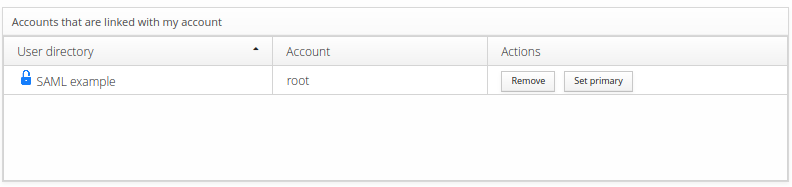
Only one link can be primary at any given time. Primary links are used to update certain single-value attributes such as first and last name. Primary link can also be unset which means that Trivore ID is the master data for that user account.
End users are able to manage their user directory links in using the dashboard panel shown below.
Creating user accounts on-demand via suomi.fi-tunnistus
In this use case, we will create user accounts to a namespace dynamically when a person signs in to Trivore ID using suomi.fi-tunnistus user directory. The user directory requires a specific configuration for this to function correctly. The following settings are key for this functionality to work:
-
Select: Link user with directory
-
Select: Allow creating new users
-
Link ID value: urn:oid:1.2.246.21
-
Select: Encrypt Link ID using salted hash algorithm
-
How to handle conflicts with soft-deleted users: Exsiting soft-deleted user will be activated and replaces with new user information
Automatic redirect to user directory on OpenID sign-in
When the user is directed to Trivore ID OpenID Connect authentication,
you can have them be automatically redirected to the external user directory
authentication and bypass the Trivore ID sign-in entry screen completely by
adding the acr_values query parameter.
Value of the acr_values query parameter is the full URN of
the user directory. It is available after you define Alias for the
user directory.
It is in the format urn:trivoreid:{DOMAIN}:userdirectory:{ALIAS}
See example below:
GET /openid/auth?client_id=0000&{other parameters}&acr_values=urn:trivoreid:id.example.com:userdirectory:example-directory
Remember to URL encode special characters in the URN value if necessary. The example value encoded is urn%3Atrivoreid%3Aid.example.com%3Auserdirectory%3Aexample-directory.
Replace id.example.com with your ID hostname.
Note that when validating id_token you should ensure that its acr claim contains the exact same value that was used in acr_values query parameter. This ensures that authentication happened via that user directory and user did not manipulate authentication request parameters. This is critical especially when not using signed authentication requests.